Perbandingan DiskMop vs Microsoft PC Manager 2026
A detailed breakdown of Microsoft's official utility versus an all-in-one disk cleanup suite
Microsoft PC Manager has become a popular choice for Windows 10 and 11 users looking for a free, built-in system utility. It provides basic tools such as memory boost, storage cleanup shortcuts, and security checks. However, when users face severe C drive storage shortages, PC Manager's surface-level cleaning frequently falls short.
DiskMop is designed specifically for thorough disk recovery and storage visualization across Windows, macOS, Android, and iOS. In this guide, we break down how both tools compare in deep cleaning capabilities, duplicate file detection, storage visualization, privacy, and overall value.
Poin Penting
- Microsoft PC Manager is a free Windows tool great for quick RAM boosts, but only removes surface-level temporary files.
- DiskMop detects hidden multi-gigabyte AppData caches, old update backups, and game shader caches that PC Manager misses.
- Unlike PC Manager, DiskMop includes a byte-for-byte SHA-256 duplicate file finder and visual disk treemap analyzer.
- DiskMop is fully cross-platform (Windows, Mac, Android, iOS) with a one-time $19.90 lifetime license and zero telemetry.
- For everyday RAM flushing, PC Manager is convenient; for freeing 20–100 GB of actual disk space, DiskMop is significantly superior.
Reclaim GBs of disk space with DiskMop today
DiskMop otomatis memindai, mengenali, dan membersihkan dengan aman cache tersembunyi, sisa aplikasi, dan sampah sistem.
Tabel Perbandingan
| Fitur | Disk Mop | Microsoft PC Manager |
|---|---|---|
| Harga & Lisensi | $19.90 (Sekali bayar seumur hidup) | Gratis (disertai promosi Edge) |
| Dukungan Platform | Windows, macOS, Android, iOS | Windows 10/11 only |
| Analisis Disk Visual Treemap | ✓ | ✗ |
| Pencari File Duplikat SHA-256 | ✓ | ✗ |
| Pembersihan Mendalam AppData & Cache | ✓ | Hanya file temp permukaan |
Disk Mop
Kelebihan
- Deep AppData, cache, and system leftover removal
- Interactive visual Treemap storage analysis
- Accurate SHA-256 duplicate file detection
- Universal support for Windows, macOS, Android, and iOS
- One-time $19.90 lifetime license with no recurring fees
- Zero promotional bloat or browser lock-in prompts
Kekurangan
- Commercial software ($19.90 one-time payment)
- Does not include active RAM memory booster or antivirus widget
Microsoft PC Manager
Kelebihan
- 100% free official Microsoft Store utility
- Convenient one-click RAM memory purge button
- Direct integration with Windows Update and Defender
- Safe and lightweight for basic maintenance
Kekurangan
- Windows-only; no Mac or mobile support
- Surface-level cleaning leaves dozens of gigabytes behind
- No duplicate file finder or visual disk treemap
- Promotes Microsoft Edge browser and default app switches
DiskMop vs Microsoft PC Manager: Feature Comparison Matrix
| Capability | DiskMop | Microsoft PC Manager | Advantage |
|---|---|---|---|
| Deep AppData & Cache Cleaning | Yes (Thorough detection across apps) | Basic temporary files only | DiskMop |
| Duplicate File Finder | Yes (SHA-256 content verification) | No | DiskMop |
| Visual Storage Treemap | Yes (Interactive block map) | No (Bar charts only) | DiskMop |
| RAM Booster & Process Killer | No (Focuses on disk health) | Yes (One-click memory boost) | PC Manager |
| Platform Availability | Windows, Mac, Android, iOS | Windows 10/11 only | DiskMop |
| License Model | $19.90 One-time Lifetime | Free (bundled with Edge prompts) | Tie / Value-dependent |
Cleaning Depth: Surface Temp Files vs Deep AppData
Microsoft PC Manager interacts primarily with the standard Windows Storage API. While this ensures complete safety, it means the tool only flushes standard user temporary folders (%temp%) and Windows prefetch files, typically reclaiming only a few hundred megabytes to 2 gigabytes.
DiskMop digs deeper into application support directories, developer environment caches (npm, gradle, pip), browser multi-profile caches, and game shader stores. This routinely reclaims 15 to 40 GB of hidden space without endangering user settings or documents.
Storage Visualization: Treemap vs Simple Lists
Finding what is consuming drive capacity is half the battle. PC Manager lists general categories like 'Large files' in plain file explorer lists with limited sorting flexibility.
DiskMop employs an interactive visual Treemap: folders are rendered as proportional blocks. You can instantly spot forgotten ISO images, bloated virtual machine disks, or duplicate video projects in seconds.
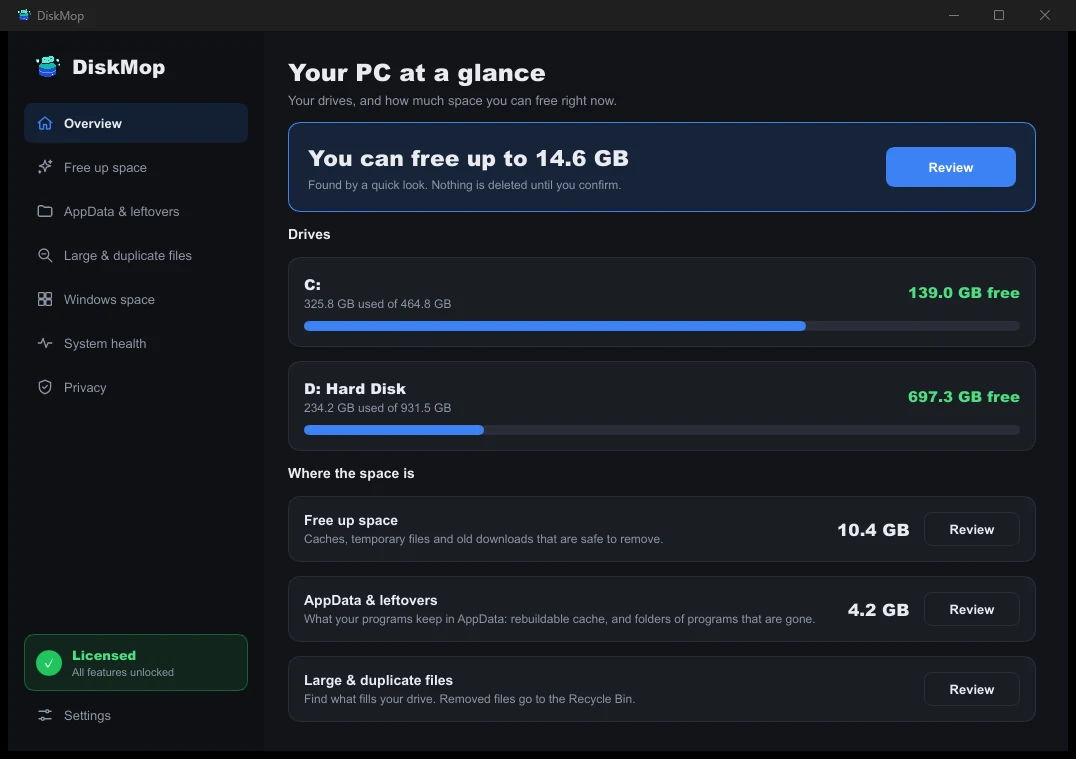
Cara DiskMop Mengatasinya: Ikhtisar
Lihat seluruh penggunaan disk dalam satu layar. Langsung kenali area yang bisa dibersihkan.
Duplicate Management and Multi-Device Coverage
Duplicate downloads and media files are one of the leading causes of storage exhaustion. PC Manager has no duplicate file scanner. DiskMop provides a built-in SHA-256 hash scanner that confirms exact matches regardless of file names.
Furthermore, PC Manager is strictly confined to Windows. DiskMop protects your Mac, iPhone, and Android phone under the exact same purchase.
Pertanyaan yang Sering Diajukan
Is Microsoft PC Manager safe to use?
Yes, Microsoft PC Manager is an official application created by Microsoft. It uses documented Windows APIs and will not corrupt essential operating system files.
Can I use DiskMop alongside Microsoft PC Manager?
Absolutely. You can use PC Manager for its handy RAM boost button on low-memory PCs, and rely on DiskMop for deep disk cleanup, duplicate removal, and visual disk mapping.
Why does DiskMop find so much more space than PC Manager?
PC Manager only clears standard %temp% folders. DiskMop scans hidden AppData caches, browser databases, uninstalled leftovers, and duplicate downloads that Windows default tools ignore.
Kesimpulan
Microsoft PC Manager is an enjoyable, lightweight freebie for everyday Windows maintenance and quick RAM purges. However, it is not a comprehensive storage recovery solution.
When your hard drive or SSD is running out of space, DiskMop's deep cleaning, visual treemap, and duplicate finder deliver real, multi-gigabyte results across all your devices for a single one-time payment of $19.90.
Reclaim GBs of disk space with DiskMop today
DiskMop otomatis memindai, mengenali, dan membersihkan dengan aman cache tersembunyi, sisa aplikasi, dan sampah sistem.