How to Clear npm, pip, NuGet and Gradle Caches on Windows
Reclaim space from developer package caches and know exactly what you are giving up
Package managers keep a copy of everything they download. npm, pip, NuGet and Gradle each have a cache folder in your profile, and on a developer machine these folders commonly grow to several gigabytes. They are safe to clear because the packages can be downloaded again; the price is that the next install or build needs an internet connection and takes longer.
This guide lists where each cache lives, the official command to clear it, and what to expect afterwards, and it shows how to clear all four in one pass with Disk Mop. It also explains why these caches are not selected by default in a cleaner, and when it is better to leave them alone.
Key Takeaways
- npm, pip, NuGet and Gradle keep every package they download in a cache so builds are fast; the cache can always be downloaded again, so clearing it is safe but needs an internet connection afterwards.
- Each tool has its own clear command (npm cache clean --force, pip cache purge, dotnet nuget locals all --clear), while Gradle's cache is cleared by deleting its caches folder with Gradle stopped.
- The first build after clearing is slower because every dependency is downloaded again, so avoid clearing right before a deadline or when you are offline.
See how much space your developer caches take with Disk Mop
DiskMop automatically scans, identifies, and safely cleans hidden caches, app leftovers, and system junk.
Package manager caches on Windows
| Tool | Cache location | Official clear command | What happens next |
|---|---|---|---|
| npm | %LOCALAPPDATA%\npm-cache (older setups: %APPDATA%\npm-cache) | npm cache clean --force | Packages are downloaded again on the next install |
| pip | %LOCALAPPDATA%\pip\Cache | pip cache purge | Wheels and downloads are fetched again when needed |
| NuGet | %LOCALAPPDATA%\NuGet\v3-cache and plugins-cache | dotnet nuget locals all --clear | Packages are restored again on the next build |
| Gradle | %USERPROFILE%\.gradle\caches | No command; delete the caches folder with Gradle stopped | Dependencies are downloaded again on the next build |
Why Developer Caches Get So Big
Every time you install a dependency, the tool saves the downloaded archive in a cache before it unpacks it into your project. The next project that needs the same version reuses the cached copy instead of downloading it. That is a good trade for speed, but the cache never forgets: old versions of packages from projects you finished years ago stay in it.
Gradle is usually the largest. Its caches folder holds downloaded dependencies, transformed artifacts and build data for every project and every version it has seen, and it commonly reaches several gigabytes. NuGet and pip grow more slowly, and npm sits in between.
None of this is your source code. A cache holds only things that can be fetched again from the package registry.
npm and pip
npm keeps its cache in %LOCALAPPDATA%\npm-cache; some older installs use %APPDATA%\npm-cache. The official way to clear it is npm cache clean --force. Plain npm cache clean without the flag refuses to run, because npm treats the cache as self-healing. Your node_modules folders are separate and are not affected.
pip stores downloads and built wheels in %LOCALAPPDATA%\pip\Cache. Clear it with pip cache purge, or look at what it holds first with pip cache info and pip cache list. Virtual environments are not touched; only the stored downloads are removed.
After either command, the next install of a package is a normal download.
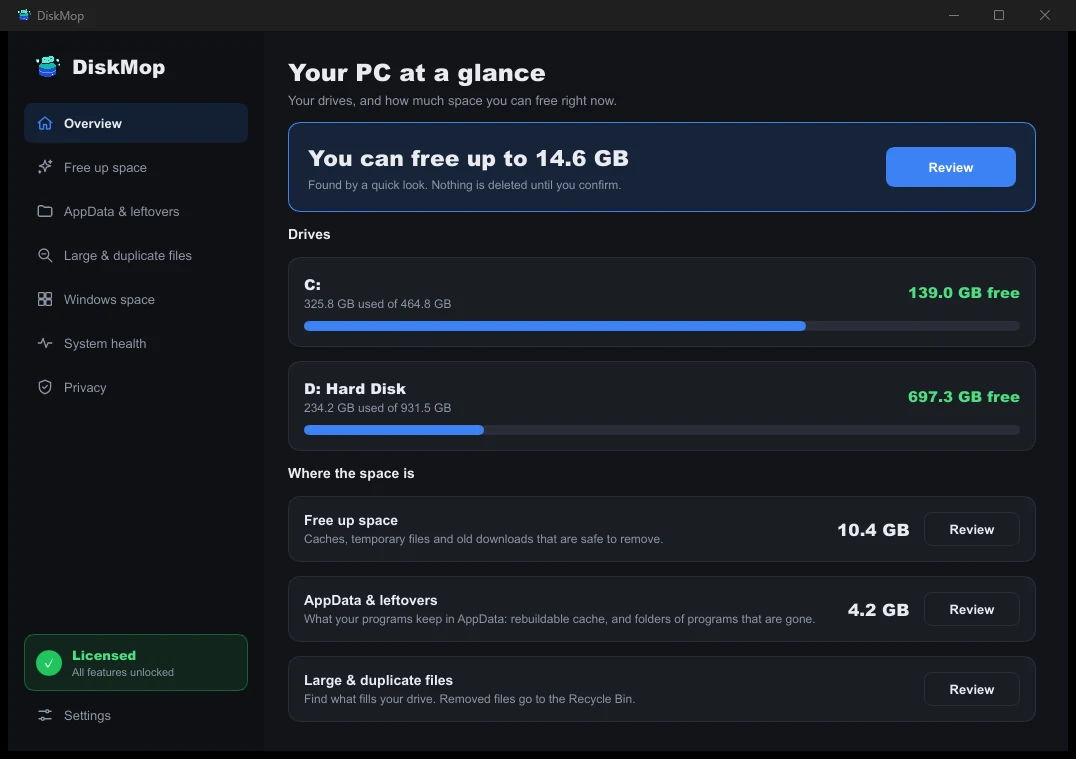
How DiskMop Solves This: Overview
See all your disk usage on a single screen. Instantly identify areas that can be cleaned.
NuGet and the Windows Web Cache
NuGet keeps downloaded packages in %LOCALAPPDATA%\NuGet\v3-cache and plugins in plugins-cache. To see everything, run dotnet nuget locals all --list; to clear it, run dotnet nuget locals all --clear. The global packages folder under your profile is a different thing: it holds packages that restored projects use, and clearing it means a full restore for each project.
Disk Mop groups the NuGet caches together with the Windows INetCache folder under NuGet and web cache. INetCache holds web content cached by Windows components and is rebuilt automatically.
Close Visual Studio before you clear, because it keeps files in these folders open while it is running.
Gradle
Gradle's cache is %USERPROFILE%\.gradle\caches. There is no official one-line command that clears the whole thing; the usual way is to stop Gradle and delete the contents of the caches folder. Run gradle --stop first so that no daemon is holding files open, and close Android Studio or IntelliJ.
The next build downloads every dependency again, which can take a few minutes on a large project, and Gradle rebuilds its transformed artifacts. Settings in the .gradle folder, such as gradle.properties, sit outside the caches folder and are not removed when you delete only that folder.
If you keep several Android projects, expect Gradle to be the single biggest win in this guide.
Clear Them in One Pass with Disk Mop
Disk Mop's Free up space page lists npm cache, pip cache, NuGet and web cache and Gradle cache as separate items, each with its size and the note that your tools download the packages again when needed. They are not selected by default, because clearing them has a cost you should choose on purpose: the next build needs the internet.
Run the scan, tick the caches you want and confirm. Disk Mop shows what it found before it deletes anything, and scanning is free. Close your IDE and any running build first so that files in use do not get skipped.
If you do not want to wait for downloads, clear only the cache you rarely use and keep the one for the project you are working on.
Frequently Asked Questions
Is it safe to delete the npm cache?
Yes. The npm cache is a store of packages that npm has already downloaded. Clearing it does not change your projects or your node_modules folders; npm just downloads packages again when you next install them. npm itself recommends npm cache clean --force for this.
Will clearing the Gradle cache break my projects?
No. The files in the caches folder are downloaded dependencies and build data. Your source code is not stored there. The next build downloads what it needs again, which takes longer and needs an internet connection.
Why does pip keep a cache?
pip stores the packages and built wheels it downloads, so installing the same package in another virtual environment is fast and does not need a download. Clearing it with pip cache purge only removes that stored copy.
Does the NuGet web cache include browser data?
The NuGet and web cache covers NuGet's package caches and the Windows INetCache folder, which is a cache used by Windows components for web content. It is rebuilt on its own and does not contain your documents.
Verdict
The npm, pip, NuGet and Gradle caches are copies of packages that can always be downloaded again, so clearing them is safe and often frees many gigabytes. Use the official commands for npm, pip and NuGet, and delete the caches folder for Gradle with Gradle stopped.
Disk Mop lists all four caches on its Free up space page, shows the size of each and leaves them unselected until you choose. Scanning is free, so you can see which cache is worth clearing before you decide.
See how much space your developer caches take with Disk Mop
DiskMop automatically scans, identifies, and safely cleans hidden caches, app leftovers, and system junk.